Adding CUB LInks
To activate CUB on your website, you need to add a CUB link. This tells the platform what keywords to link (and with which sportsbooks).
To add a CUB link, go the the CUB LINKS section of your dashboard. This section appears on a per-site basis, so you'll need to have added a website to your dashboard before you can access this area.
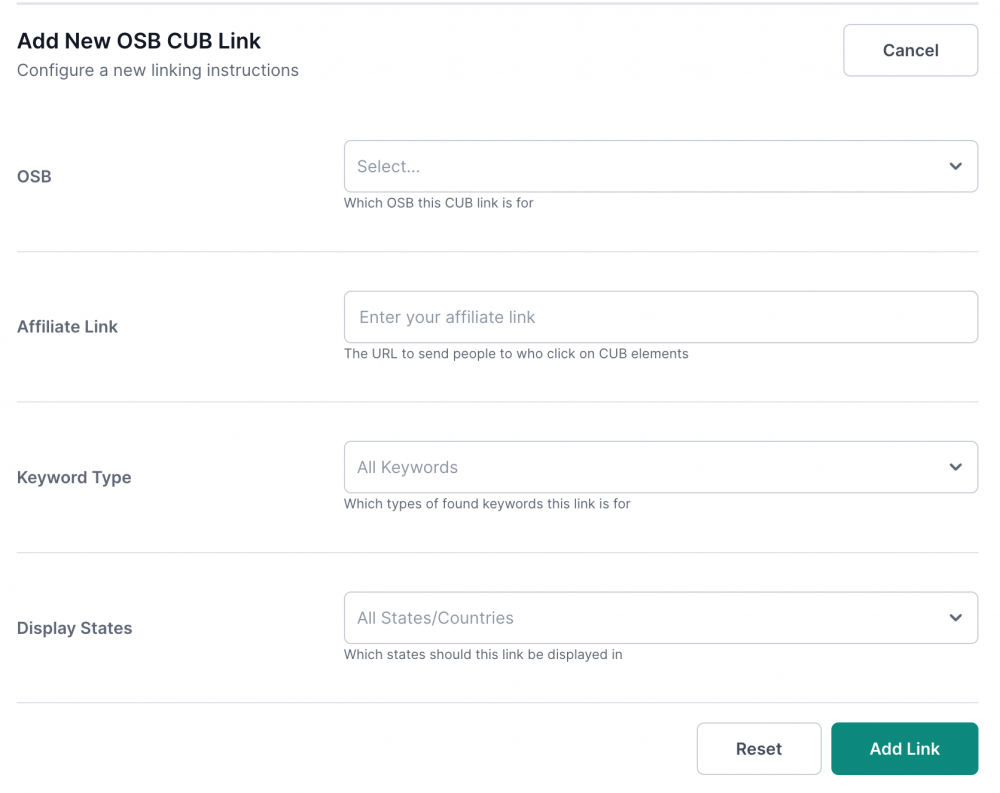
Once there, click "Add CUB link" and you'll see the following options:
OSB
From this dropdown, select the sportsbook or fantasy platform that you want to link to.
Affiliate link
In this field, enter your affiliate code provided by the sportsbook. If you plan to setup custom links based on the location of your readers, enter the geo-targeted affiliate link here.
Keyword type
From here, you can choose which keywords to link: Player names, locations, team names, or event names. Leave this blank to have CUB automatically link all possible keywords.
Display States
This is where you setup geo-targeting. Leave this blank to have the CUB link you're creating show up to everyone, or enter in states or countries to geo-target this link so that it only shows up to readers who are based in certain locations.